


How to Subscribe Safely to OnlyFans in 2026
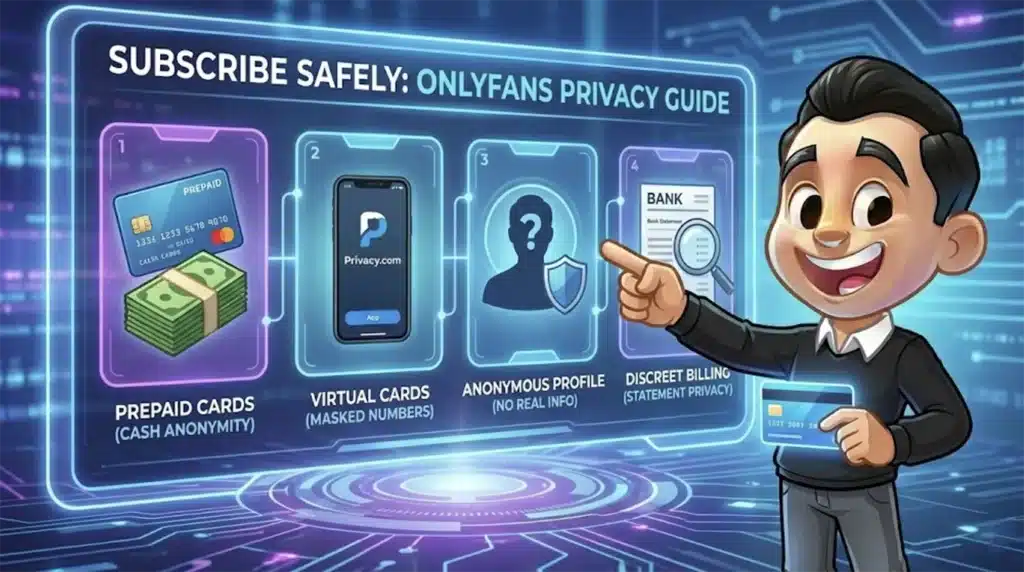
Image created using advanced AI technology, professionally refined by MyPornBible editorial team.
Payment privacy, prepaid card tricks, what actually shows on your bank statement, and how to protect your identity as a subscriber. Everything you need to know before spending a dime.
Why Does OnlyFans Privacy Matter?
OnlyFans privacy matters because your subscription activity is tied to your real payment information, and a careless sign-up can leave a trail on bank statements, email inboxes, and even data breach databases.
Unlike free tube sites where you're basically anonymous, OnlyFans requires a credit card on file — even for free subscriptions. That means your real name, billing address, and card number are connected to your account.
This isn't just about hiding your porn habits from a nosy partner (though that's valid). It's about data security, financial protection, and controlling your digital footprint. Data breaches happen, and when they do, you don't want your OnlyFans account linked to your primary bank card.
OnlyFans doesn't accept cryptocurrency, PayPal, or Cash App. Every payment goes through a traditional card processor. That's exactly why knowing how to manage your billing privacy is essential.
What Appears on Your Bank Statement?
OnlyFans charges appear on your bank statement as "OnlyFans" or "OF" followed by the payment processor name — not as a generic or disguised merchant name. There is no built-in billing discretion.
The exact descriptor varies depending on your bank and card issuer, but common formats include "OnlyFans", "OF *OnlyFans", or "Fenix Internet LLC" (their parent company). Some users have reported seeing "Fenix Intl" as the merchant name.
Common Statement Descriptors
The charge on your statement will typically show one of these formats. The amount, date, and sometimes the specific creator's page are associated with the transaction in OnlyFans' internal records — but the creator's name does not appear on your bank statement.
| Descriptor | Where It Appears | How Common |
|---|---|---|
| OnlyFans | Most major banks | Very Common |
| OF *OnlyFans | Visa/Mastercard | Common |
| Fenix Internet LLC | Some US banks | Moderate |
| Fenix Intl | International cards | Less Common |
Bottom Line
Anyone who checks your bank or credit card statement will see "OnlyFans" by name. There's no way to change this on the platform's end. The only solution is using a separate payment method entirely.
Can You Use Prepaid Cards on OnlyFans?
Yes, OnlyFans accepts most prepaid Visa and Mastercard debit cards, and this is the single best method for keeping your subscription completely off your primary bank statement.
Prepaid cards work because they're not linked to your bank account or identity. You buy one at a store with cash, load it with funds, and use it as your payment method on OnlyFans. The charge appears on the prepaid card's account — which nobody else has access to.
How to Set Up a Prepaid Card for OnlyFans
Step 1: Buy a prepaid Visa or Mastercard from any pharmacy, grocery store, or gas station. Avoid store-specific gift cards (Amazon, Target) — they won't work.
Step 2: Register the card online. Most prepaid cards require activation and a ZIP code. Use your real ZIP code for billing verification to go through.
Step 3: Add the card to your OnlyFans payment settings. OnlyFans will place a small authorization hold (usually $0.10) to verify the card is valid.
Step 4: Subscribe to creators. When the card runs out of funds, the subscription simply lapses — no overdraft fees, no recurring charges hitting a bank account.
Some prepaid cards block adult merchant codes. If your card is declined, it's not an OnlyFans issue — it's the card issuer. Vanilla Visa and NetSpend cards have the best acceptance rates for adult sites.
Best Payment Methods for Privacy
The best payment method for anonymous OnlyFans subscriptions is a prepaid Visa bought with cash, followed by virtual card services like Privacy.com that mask your real card number from merchants.
Each payment method offers a different trade-off between convenience and privacy. Here's how they stack up for keeping your OnlyFans activity invisible.
Virtual Card Services
Privacy.com generates disposable virtual card numbers linked to your bank account but showing a custom merchant name on your statement. You can set the charge to appear as "Internet Services" or anything else you choose. The downside: Privacy.com itself knows about the transaction.
Other virtual card providers include Revolut (which lets you create temporary virtual cards) and some fintech apps that offer single-use card numbers.
Dedicated Debit Card
Opening a separate checking account with a debit card creates a complete firewall between your OnlyFans spending and your primary finances. Online banks like Chime or Current make this easy — no minimum balance, no fees, and a separate statement nobody else sees.
This approach takes more effort upfront but gives you the most control long-term, especially if you subscribe to multiple creators or use other premium adult platforms.
How to Protect Your Identity as a Subscriber
Protecting your identity on OnlyFans goes beyond payment — it includes your username, email address, profile settings, and digital behavior. A careless setup can expose you even if your billing is airtight.
Use a Dedicated Email Address
Create a separate email account specifically for adult subscriptions. Gmail, ProtonMail, or Tutanota all work. Never use your work email, your primary personal email, or any address connected to your real name.
ProtonMail is the strongest choice here because it's end-to-end encrypted and based in Switzerland. OnlyFans sends email notifications for new posts, messages, and billing — you don't want those landing in your main inbox.
Choose a Username That Reveals Nothing
Your OnlyFans display name and username are visible to every creator you subscribe to. Don't use your real name, your usual internet handle, or anything that could be traced back to you through a simple Google search.
Pick something generic or random. "User847291" is infinitely safer than "JohnFromChicago." Creators can see your username when you subscribe, tip, comment, or send messages.
Lock Down Your Profile Settings
OnlyFans profiles are private by default, but double-check these settings: Don't upload a profile photo that shows your face. Don't fill in bio information. Don't link any social media accounts. Keep your profile as blank as possible.
Also disable "Show activity status" if available — this prevents creators from seeing when you're online and browsing.
If you're exploring adult content beyond OnlyFans — including live cams, premium sites, or AI-generated content — the same privacy principles apply across every platform. Browse the full directory at MyPornBible.com for verified, safe options.
What Can Creators See About You?
OnlyFans creators can see your display name, username, and profile picture — but they cannot see your real name, email address, or payment information. Your billing details are handled entirely by the payment processor.
This is a common concern, and the answer is reassuring. Creators see the same information that any other user would see on your profile. Financial data stays on OnlyFans' backend and is never shared with creators.
| Information | Visible to Creators? | Notes |
|---|---|---|
| Display Name | Yes | Shown on subscription, tips, messages |
| Username | Yes | Your @handle is visible |
| Profile Photo | Yes | Keep it blank or generic |
| Email Address | No | Never shared with creators |
| Real Name | No | Only on billing, not visible |
| Card Number | No | Handled by payment processor |
| IP Address | No | Not accessible to creators |
| Subscription Amount | Yes | Creator sees what you paid |
| Tip Amounts | Yes | Creator sees tip value + your name |
Good News
The only way a creator could identify you is through information you voluntarily share — your username, profile photo, or direct messages. Keep those clean and you're effectively invisible.
A separate but related risk is AI-generated deepfakes — if you're concerned about non-consensual content using your likeness, our deepfake protection guide covers detection and removal tools.
Privacy Method Comparison
Here's a side-by-side breakdown of every privacy method — cost, effort, and actual protection level — so you can pick the right approach.
| Method | Privacy | Cost | Effort |
|---|---|---|---|
| Prepaid Visa (cash) | Excellent | $3–5 fee | Low |
| Privacy.com | Very Good | Free | Low |
| Separate Bank Acct | Good | Free | Medium |
| Revolut Virtual Card | Good | Free | Low |
| Regular Credit Card | Poor | $0 | None |
For most people, a prepaid Visa purchased with cash is the sweet spot — maximum privacy with minimum hassle. It takes 10 minutes at a drugstore and costs under $5 in activation fees. Pair that with a dedicated email and anonymous username, and you're virtually untraceable.
The same privacy-first approach works for any paid adult platform, from live cam sites to premium porn networks. If a site requires payment, your billing privacy strategy should always be in place before you enter card details.
Final Privacy Checklist
- OnlyFans charges show as "OnlyFans" on bank statements. There is no discretion built in. Use a separate payment method to avoid this.
- Prepaid Visa cards bought with cash provide the highest anonymity. They're widely accepted, cheap, and leave no connection to your bank account.
- Virtual card services like Privacy.com are an excellent digital alternative. They mask your real card number and let you customize statement descriptors.
- Creators cannot see your real name, email, or payment details. They only see your display name, username, and profile photo — all of which you control.
- Use a dedicated email for all adult subscriptions. ProtonMail is ideal for privacy-focused communication.
- Keep your OnlyFans profile blank. No real photo, no bio, no social media links. A generic username completes your anonymity.
- These privacy methods work across all paid adult platforms — not just OnlyFans. Apply the same approach everywhere you use payment information for adult content.
Subscribing to OnlyFans doesn't have to be a privacy risk. With the right setup — a prepaid card, a clean email, and an anonymous profile — you can enjoy the content without leaving a trace on your financial records.
Looking beyond this guide? Check out our comprehensive ranking of the best porn sites — we keep it current as platforms change..